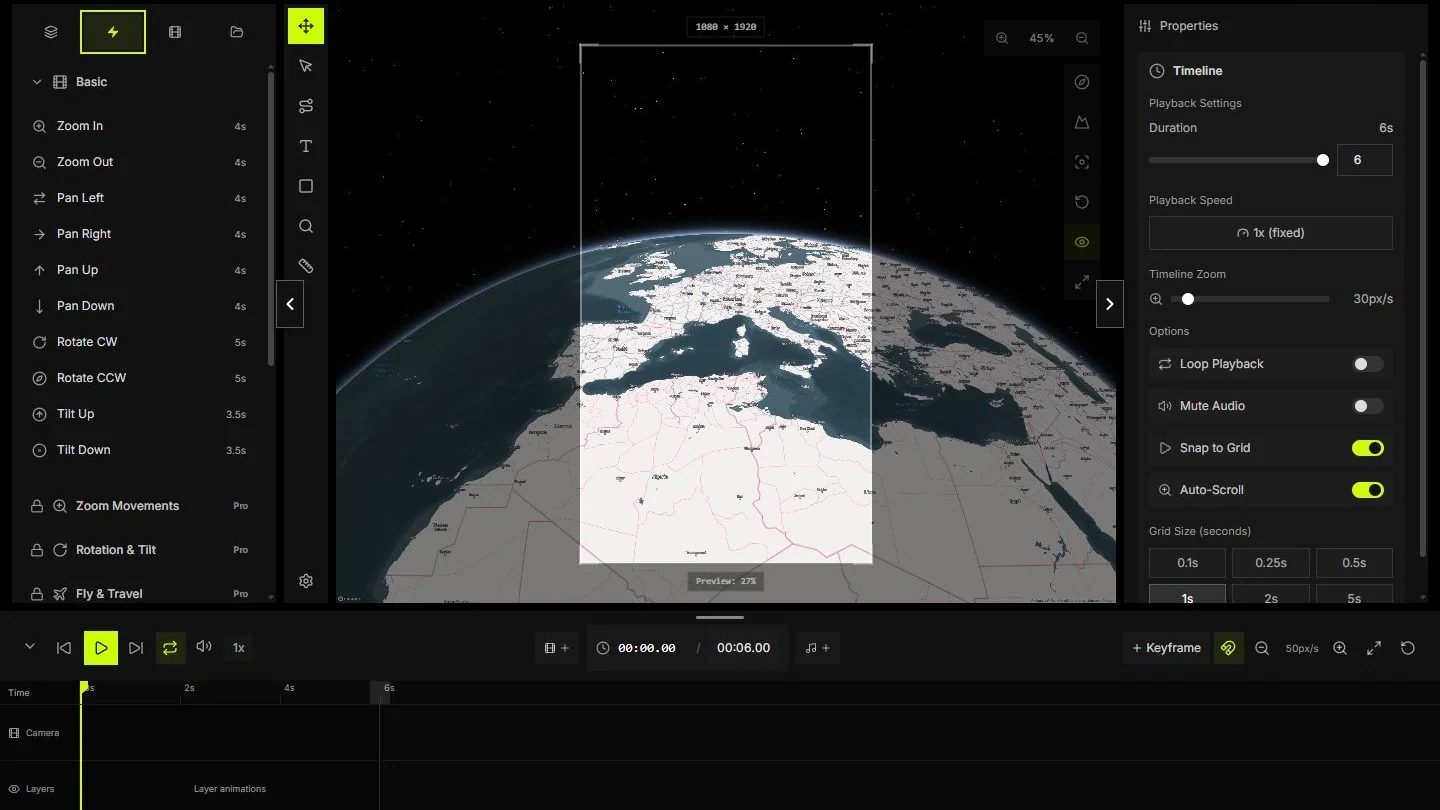
Animation presets v1.01: choose and adapt a move
Find a preset by its purpose, place it on the timeline and review its camera values before export.
Reviewed
A preset supplies a starting camera movement. It cannot decide which place matters or how long a viewer needs to read its label. This guide explains how to choose a movement, inspect the generated keyframes and adjust the shot without treating a preset name as a guarantee of a good result.
Choose a preset by the information it reveals
Open Presets and choose a folder that matches the task. A zoom can introduce a city; a travel move can connect places; a restrained pan can leave space for a caption. Check the generated keyframes after applying a preset.
Keep a copy of a working shot before trying another move. Compare the first and last camera positions, duration and label visibility. Folder names identify groups of movements, not quality levels or promises about export performance.
- Choose the movement's purpose before its name.
- Inspect the inserted keyframes and their time range.
- Adapt the endpoint to your map and output format.
Establish the region, then approach the destination
Begin with north up and a low pitch so viewers can identify the geography. For the exercise, center the regional view near 7.5° east and 46° north. Approach Rome at 12.4964° east and 41.9028° north. Tune zoom to the chosen frame instead of copying a number blindly.
Change one property at a time. Pitch reveals height, bearing rotates the map and zoom changes scale. Large changes in all three can make a short shot hard to follow.
- Check the origin and destination in a flat view.
- Try a pitch near 30° if relief matters.
- Hold the final frame long enough to read its label.
Plan keyframes and the reading pauses
Use the shot plan as a starting point: context at 0 seconds, the destination reached at 4 seconds and a hold until 6 seconds. Match the project duration to that plan. A six-second delivery at 30 frames per second contains about 180 frames; the final sampled frame is near 5.97 seconds.
Move the playhead through the start, middle and end. Check labels at the exact moments when the route enters and leaves the frame.
- Set the duration before arranging clips.
- Add camera keyframes only where the move needs to change.
- Scrub near 0, 3 and 5.9 seconds to check the whole composition.
Match easing to the purpose of the shot
A constant-speed move helps compare locations or follow a route. An ease-in or ease-out can soften an arrival. Neither choice guarantees a better result. Watch the transition between adjacent keyframes, not only the movement inside each segment.
Keep position and scale changes modest while testing the curve. If the camera hesitates at every keyframe, remove an unnecessary point or choose a curve that keeps the intended continuity.
- Compare a linear move with a softened arrival.
- Watch for a pause at the join between segments.
- Make the final hold deliberate rather than an accidental slowdown.
Compare the exported file with the preview
Check a short export before rendering a long sequence. Compare the first frame, a moving frame and a frame near the end. Look at route thickness, text edges, crop, terrain and overlays at the same playhead time.
If something differs, isolate one cause. A crop mismatch points to composition settings; blocky moving detail may need more bitrate; a soft source image stays soft at a higher output resolution. Use image output for a still-frame check where appropriate.
- Compare at the same dimensions and time.
- Change one setting and export the same short range again.
- Inspect the delivered file after any upload or recompression.
Explore the preset catalogue
Values come from the editor's current presets at a sample camera position. Names identify the presets in Studio. Duration can change when you edit their keyframes.
Results: 117 / 117
- Basic
Zoom In
basic-zoom-in4 s · 2 keyframes
Zoom in · Tilt
- Basic
Zoom Out
basic-zoom-out4 s · 2 keyframes
Zoom out · Tilt
- Basic
Pan Left
basic-pan-left4 s · 2 keyframes
Pan
- Basic
Pan Right
basic-pan-right4 s · 2 keyframes
Pan
- Basic
Pan Up
basic-pan-up4 s · 2 keyframes
Pan
- Basic
Pan Down
basic-pan-down4 s · 2 keyframes
Pan
- Basic
Rotate CW
basic-rotate-cw5 s · 2 keyframes
Rotate
- Basic
Rotate CCW
basic-rotate-ccw5 s · 2 keyframes
Rotate
- Basic
Tilt Up
basic-tilt-up3.5 s · 2 keyframes
Tilt
- Basic
Tilt Down
basic-tilt-down3.5 s · 2 keyframes
Tilt
- Zoom movements
Zoom In
zoom-in4 s · 2 keyframes
Zoom in · Tilt
- Zoom movements
Zoom Out
zoom-out4 s · 2 keyframes
Zoom out · Tilt
- Zoom movements
Crash Zoom
crash-zoom1.5 s · 2 keyframes
Zoom in · Tilt
- Zoom movements
Slow Reveal
slow-reveal7 s · 2 keyframes
Zoom out · Tilt
- Zoom movements
Spiral Zoom
spiral-zoom7 s · 2 keyframes
Zoom in · Tilt · Rotate
- Rotation and tilt
360 World
360-world12 s · 2 keyframes
Pan
- Rotation and tilt
Panoramic Sweep
panoramic-sweep6 s · 2 keyframes
Rotate
- Rotation and tilt
Orbit Settle 45°
rot-tilt-orbit-settle-454 s · 2 keyframes
Tilt · Rotate
- Rotation and tilt
Orbit Settle 90°
rot-tilt-orbit-settle-905 s · 2 keyframes
Tilt · Rotate
- Rotation and tilt
Tilt Reveal Up
rot-tilt-tilt-reveal-up3.5 s · 2 keyframes
Tilt
- Rotation and tilt
Tilt Reveal Down
rot-tilt-tilt-reveal-down3.5 s · 2 keyframes
Tilt
- Rotation and tilt
Parcel Flat → 3D
rot-tilt-parcel-flat-to-3d4 s · 2 keyframes
Zoom in · Tilt
- Rotation and tilt
Compass Peek
rot-tilt-compass-peek3.2 s · 2 keyframes
Tilt · Rotate
- Rotation and tilt
Micro Align
rot-tilt-micro-align2.4 s · 2 keyframes
Rotate
- Rotation and tilt
Dutch Settle
rot-tilt-dutch-settle3.2 s · 2 keyframes
Tilt · Rotate
- Rotation and tilt
Cinematic Arc
rot-tilt-cinematic-arc5 s · 2 keyframes
Zoom in · Tilt · Rotate
- Rotation and tilt
Overhead Settle
rot-tilt-overhead-settle4 s · 2 keyframes
Zoom in · Tilt
- Fly and travel
Fly Around
fly-around14 s · 9 keyframes
Tilt · Rotate · Zoom in · Zoom out
- Fly and travel
Drone Descent
drone-descent6 s · 2 keyframes
Zoom in · Tilt
- Fly and travel
Helicopter Shot
helicopter-shot8 s · 2 keyframes
Zoom in · Tilt · Rotate
- Fly and travel
Approach
approach6 s · 2 keyframes
Pan · Zoom in · Tilt
- Fly and travel
Arrival Glide
flytravel-arrival-glide5 s · 2 keyframes
Pan · Zoom in · Tilt · Rotate
- Fly and travel
Bank Left Approach
flytravel-bank-left-approach6 s · 3 keyframes
Pan · Zoom in · Tilt · Rotate
- Fly and travel
Bank Right Approach
flytravel-bank-right-approach6 s · 3 keyframes
Pan · Zoom in · Tilt · Rotate
- Fly and travel
Commute Sweep
flytravel-commute-sweep7 s · 2 keyframes
Pan · Zoom in · Tilt · Rotate
- Fly and travel
High Altitude Drop
flytravel-high-altitude-drop6.5 s · 2 keyframes
Zoom in · Tilt
- Fly and travel
Drone Ascent
flytravel-drone-ascent6 s · 2 keyframes
Zoom out · Tilt
- Fly and travel
Heading Turn
flytravel-route-heading-turn5 s · 2 keyframes
Rotate
- Fly and travel
Wide Transit
flytravel-wide-transit8 s · 2 keyframes
Pan · Zoom in · Tilt · Rotate
- Fly and travel
Pass Over
flytravel-pass-over4.5 s · 2 keyframes
Pan · Zoom in · Tilt · Rotate
- Cinematic
Establishing Shot
establishing-shot7 s · 2 keyframes
Zoom in · Tilt
- Cinematic
Hero Shot
hero-shot5 s · 2 keyframes
Zoom in · Tilt · Rotate
- Cinematic
POV Shot
pov-shot4 s · 2 keyframes
Zoom in · Tilt
- Cinematic
Pullback Reveal
pullback-reveal6 s · 2 keyframes
Zoom out · Tilt · Rotate
- Cinematic
Silky Glide
silky-glide12 s · 2 keyframes
Zoom in · Tilt · Rotate
- Cinematic
Perpetual Orbit
perpetual-orbit20 s · 9 keyframes
Tilt · Rotate
- Cinematic
Velvet Drift
velvet-drift14 s · 3 keyframes
Pan · Zoom in · Tilt · Rotate · Zoom out
- Cinematic
Heaven Ascent
heaven-ascent15 s · 2 keyframes
Zoom out · Tilt · Rotate
- Cinematic
Cloud Nine
cloud-nine18 s · 2 keyframes
Pan · Zoom in · Tilt · Rotate
- Dynamic effects
Push In
push-in2.5 s · 2 keyframes
Zoom in · Tilt
- Dynamic effects
Figure-8
figure-812 s · 17 keyframes
Pan · Tilt · Rotate
- Dynamic effects
Spiral Out
spiral-out7 s · 2 keyframes
Zoom out · Tilt · Rotate
- Dynamic effects
Snap Zoom Settle
dyn-snap-zoom-settle2.2 s · 2 keyframes
Zoom in · Tilt
- Dynamic effects
Reframe Slide In
dyn-reframe-slide-in3.2 s · 2 keyframes
Pan
- Dynamic effects
Parallax Drift
dyn-parallax-drift5 s · 2 keyframes
Pan · Zoom in · Tilt · Rotate
- Dynamic effects
Tilt Surge
dyn-tilt-surge3 s · 2 keyframes
Tilt · Rotate
- Dynamic effects
Tilt Drop
dyn-tilt-drop3 s · 2 keyframes
Tilt · Rotate
- Dynamic effects
Spiral In
dyn-spiral-in7 s · 2 keyframes
Zoom in · Tilt · Rotate
- Dynamic effects
Hero Arc In
dyn-hero-arc-in5 s · 2 keyframes
Zoom in · Tilt · Rotate
- Dynamic effects
Overhead Drop In
dyn-overhead-drop-in5 s · 2 keyframes
Zoom in · Tilt
- Dynamic effects
Radar Sweep
dyn-radar-sweep4 s · 2 keyframes
Tilt · Rotate
- Dynamic effects
Focus Pulse
dyn-focus-pulse3.2 s · 3 keyframes
Zoom in · Zoom out
- Real estate
Property Showcase
property-showcase7 s · 2 keyframes
Zoom in · Tilt · Rotate
- Real estate
Neighborhood Tour
neighborhood-tour8 s · 2 keyframes
Pan · Zoom in
- Real estate
Location Highlight
location-highlight3.5 s · 2 keyframes
Zoom in
- Real estate
Area Comparison
area-comparison6 s · 2 keyframes
Zoom out
- Real estate
Context → Property
realestate-context-to-property5 s · 2 keyframes
Pan · Zoom in · Tilt
- Real estate
Frontage Reveal
realestate-frontage-reveal4 s · 2 keyframes
Pan
- Real estate
Street Approach
realestate-street-approach5.5 s · 2 keyframes
Pan · Zoom in · Tilt
- Real estate
Lot Boundary Sweep
realestate-lot-boundary-sweep6 s · 2 keyframes
Pan · Zoom in · Tilt · Rotate
- Real estate
Amenities Radar
realestate-amenities-radar5 s · 2 keyframes
Pan · Zoom in · Tilt · Rotate
- Real estate
Commute Corridor
realestate-commute-corridor6.5 s · 2 keyframes
Pan · Zoom in · Tilt
- Real estate
Parcel → 3D Tilt
realestate-parcel-to-3d-tilt4.5 s · 2 keyframes
Pan · Zoom in · Tilt · Rotate
- Real estate
Listing Card Spotlight
realestate-listing-card-spotlight3 s · 2 keyframes
Pan · Zoom in
- Content creation
Intro Zoom
intro-zoom5 s · 2 keyframes
Zoom in · Tilt · Rotate
- Content creation
Route Reveal
route-reveal6 s · 2 keyframes
Zoom in · Rotate
- Content creation
Point to Point
point-to-point6 s · 4 keyframes
Pan · Zoom out · Zoom in
- Content creation
Tutorial Focus
tutorial-focus4 s · 2 keyframes
Zoom in
- Content creation
Social Media Quick
social-media-quick2.4 s · 2 keyframes
Zoom in
- Professional maps
Map Overview
map-overview7 s · 2 keyframes
Zoom in · Tilt
- Professional maps
Location Search
location-search5 s · 2 keyframes
Zoom in · Tilt · Rotate
- Professional maps
Context Peek
pro-map-context-peek4.5 s · 3 keyframes
Zoom out · Tilt · Zoom in
- Professional maps
Lateral Slide
pro-map-lateral-slide5 s · 2 keyframes
Pan · Tilt
- Professional maps
Diagonal Approach
pro-map-diagonal-approach5.5 s · 2 keyframes
Pan · Zoom in · Tilt
- Professional maps
Compass Settle
pro-map-compass-settle3.5 s · 2 keyframes
Tilt · Rotate
- Professional maps
Flat-to-Tilt
pro-map-flat-to-tilt4.5 s · 2 keyframes
Tilt
- Professional maps
Legend-Friendly
pro-map-legend-friendly5 s · 2 keyframes
Pan · Zoom in · Tilt
- Professional maps
Precision Nudge
pro-map-precision-nudge3 s · 2 keyframes
Pan · Rotate
- Utility and UI safe
Make Room: Left Panel
ui-safe-left-panel3 s · 2 keyframes
Pan
- Utility and UI safe
Make Room: Right Panel
ui-safe-right-panel3 s · 2 keyframes
Pan
- Utility and UI safe
Make Room: Lower Third
ui-safe-lower-third3 s · 2 keyframes
Pan
- Utility and UI safe
Make Room: Top Title
ui-safe-top-title3 s · 2 keyframes
Pan
- Utility and UI safe
Portrait Safe Frame
ui-safe-portrait-frame4 s · 2 keyframes
Pan · Zoom out · Tilt
- Utility and UI safe
Reset: North + Level
util-reset-north-level3.2 s · 2 keyframes
Tilt · Rotate
- Utility and UI safe
Level Only
util-level-only3 s · 2 keyframes
Tilt
- Utility and UI safe
North Only
util-north-only3 s · 2 keyframes
Rotate
- Utility and UI safe
Micro Nudge
util-micro-nudge2.4 s · 2 keyframes
Pan
- Utility and UI safe
Context Pullback
util-context-pullback4 s · 2 keyframes
Zoom out · Tilt
- Camera standards
Level + Cardinal
std-level-and-cardinal3.2 s · 2 keyframes
Tilt · Rotate
- Camera standards
Readable 3D (25°)
std-readable-3d-253 s · 2 keyframes
Tilt
- Camera standards
Hero 3D (45°)
std-hero-3d-453.5 s · 2 keyframes
Tilt
- Camera standards
Normalize Zoom (Readable)
std-normalize-zoom-readable3.5 s · 2 keyframes
Hold
- Camera standards
Normalize Zoom (Close)
std-normalize-zoom-close3.5 s · 2 keyframes
Zoom in
- Camera standards
Normalize Zoom (Wide)
std-normalize-zoom-wide3.5 s · 2 keyframes
Zoom out · Tilt
- Camera standards
Clean 3D Reset
std-reset-clean-3d4 s · 2 keyframes
Tilt · Rotate
- Creative flows
Parallax Sweep
creative-parallax-sweep5 s · 2 keyframes
Pan · Zoom in · Rotate
- Creative flows
Ribbon Drift
creative-ribbon-drift6 s · 3 keyframes
Pan · Zoom in
- Creative flows
Arc Reveal
creative-arc-reveal5.5 s · 3 keyframes
Pan · Zoom in · Rotate
- Creative flows
Pulse Focus
creative-pulse-focus2.8 s · 3 keyframes
Zoom in · Zoom out
- Creative flows
Hover Rise
creative-hover-rise6 s · 2 keyframes
Pan · Tilt
- Creative flows
Signature Drift
creative-signature-drift7 s · 2 keyframes
Pan · Zoom in · Rotate
- 2D navigation
Slide In (West)
slide-in-west3 s · 2 keyframes
Pan
- 2D navigation
Slide In (South)
slide-in-south3 s · 2 keyframes
Pan
- 2D navigation
Diagonal Sweep
diagonal-sweep4 s · 2 keyframes
Pan
- 2D navigation
S-Curve Glide
s-curve5 s · 4 keyframes
Pan
- 2D navigation
Push-In Focus
push-in-focus3.5 s · 2 keyframes
Pan · Zoom in
- 2D navigation
Context Reveal (2D)
context-reveal-2d4 s · 2 keyframes
Pan · Zoom out
Exercise files
Reference files for the exercise. Coordinates are illustrative, not road directions. The CSV is a shot plan, not a Studio import format.
Sources and verification
- MapsAnimation StudioMapsAnimation ·
- Slowly fly to a locationMapbox ·
- ProjectionsMapbox ·